Patch for Borland
TP/TC Library
written by Andreas Bauer
|
Why use old DOS Layo1 and Orcad?? Because I'm used to it.
Further Windows Layo1 doesn't translate my old DOS work properly.
It must be a hell of a job to translate a-symmetric (NON-round) pad's, because that's still the problem.
For both Layo1 and ORCAD to get working
you need a video card that can be programmed in DOS VESA mode.
For ORCAD you have to manually check and edit the CFG files if the 'DD = ' setting is pointing to the VESA800.DRV file.
This line should look like this: DD = 'VESA800.DRV'.
Look for it in: ESP.CFG, SDT.CFG, VST.CFG and VSTSDT.CFG
For Layo1 to get installed you have to patch the setup EXE files on floppy
with the Borland TP/TC patch, because they generate a Runtime Error 200.
After install you have to do the same with ALL the Layo1 EXE files,
if it is not needed the patch will tell you.
Execute the Borland patch in a DOS-box with: tppatch file.exe
Especially for old 32/16 bit and DOS mode programs I installed an old but perfectly working "PC corpse" with Windows 98SE NL. It must contain an (embedded) video card (eg Tseng Labs or Intel 82815 chipset) that can also be programmed in DOS VESA mode. And has enough CPU power (400 - 800 MHz) and much more than enough RAM (512 MB).
Never before has an antique W98 PC worked so perfectly! Also consider old Acrobat 5 Pro, for postscript to PDF conversion.
File exchange under Windows to a "Shared" folder on a more modern PC (XP - W7)
|
Waarom de oude DOS Layo1 en Orcad gebruiken??
Ik ben er vertrouwd mee! Verder vertaalt de Windows versie van Layo1 niet al mijn oude DOS werk fatsoenlijk.
Het lukt de ontwerpers blijkbaar niet om asymmetrische (dus geen ronde) pad's foutloos om te zetten.
Om zowel Layo1 als ORCAD werkend te krijgen is het nodig een oudere videokaart te gebruiken die goed te programmeren is in DOS VESA mode.
Voor Orcad moet je met de hand de CFG files kontroleren of de regel 'DD = '
wijst naar het VESA800.DRV bestand. Deze regel ziet er dan zo uit: DD = 'VESA800.DRV'.
Kijk ernaar in de bestanden: ESP.CFG, SDT.CFG, VST.CFG and VSTSDT.CFG
Om Layo1 zelfs maar geinstalleerd te krijgen moet je een patch uitvoeren op de installatie EXE bestanden
op floppy met de Borland TP/TC patch, anders krijg je een Runtime Error 200.
Na installatie moet je dat nog eens doen met ALLE Layo1 EXE bestanden, mocht het niet nodig zijn dan laat de patch dat merken.
Gebruik de Borland patch in een DOS-venster met: tppatch file.exe
Speciaal voor oude 32/16 bit en DOS mode programma's heb ik een oud maar perfect werkend "PC lijk" geistalleerd met Windows 98SE NL. Die moet een (embedded) videokaart bevatten (bijv. Tseng Labs of Intel 82815 chipset) die ook in DOS VESA mode geprogrammeerd kan worden. En voldoende CPU power heeft (400 - 800 MHz) en veel meer dan genoeg RAM (512 MB).
Nog nooit heeft een antieke W98 PC zo perfect gewerkt! Denk ook aan oude Acrobat 5 Pro, voor postscript naar PDF omzetting.
Bestands uitwisseling onder Windows naar een "Shared" map op een modernere PC (XP - W7)
|
500 LAYO1 LMC add-ons
650KB ZIP file
500 LAYO1 LMC aanvullingen met kopieer batch file
ALL the above LMC's in a booklet
made with Layo1
300KB in PDF - 27 pages
Alle bovenstaande LMC aanvullingen in een handig aanvul boekje - 27 velletjes
|
A single ZIP set with more than 500 self-designed LAYO1 for DOS LMC (component base) sets.
With a simple batch file to put them with one command on the right place.
Click over here or left to view an example PDF booklet with 27 extra LMC pages!!
Also in this floppy set: The old DOS version Linotype postscript repair utility LINO3.EXE to correct LAYO1 postscript errors on phototypeset ( Linotype & Monotype) machines and during PDF creation.
This works great with Dos-links in a DOS-BOX under Windows.
A more recent Windows version 5.3 in Visual Basic is also available further down.
It can happen under WIN-NT5 (XP and W2K) that the batch file parameters (%1) are better understood with a modified link to COMMAND.COM (from NT5 !!) than with CMD.EXE.
More background info:
In a postscript file the %%BoundingBox parameters form the boundaries of a window-box on the job that is about to print.
So your print job must be exactly in that window. The problem is: small parts are mostly NOT!
If mirroring is enabled in Version 7 a small job can even be somewhere else on that sheet: nothing is printed at all.
Happily you only see this problem if you print on anything else than an A4 or A3 printer!!! For example a phototypeset machine with a film roll or in PDF creating!
Than only what is inside the box is used.
|
Een enkel ZIP bestand met meer dan 500 zelf ontworpen LAYO1 voor DOS LMC (komponent voetafdruk) setjes.
Met een eenvoudig batch bestand om ze met een enkel kommando op hun plek te zetten.
Klik hier of links om een voorbeeld boekje met 27 pagina's in PDF te bekijken!!
Ook in deze floppy set: Het oude DOS Linotype postscript reparatie programma LINO3.EXE om LAYO1 postscript fouten te repareren die hinderlijk zijn op Linotype & Monotype fotozet machines en PDF creatie.
Verder beneden een meer recente Windows versie 5.3 in Visual Basic.
Het werkt prima met een DOS snelkoppeling naar een batchfile onder Windows. Onder WIN-NT5 ( W2K en XP) werkt het doorgeven van parameters (%1) beter met een gemodificeerde snelkoppeling naar COMMAND.COM (van NT5 !!) dan met CMD.EXE.
Wat meer achtergrond info:
In een postscript bestand bepalen de %%BoundingBox parameters de begrenzingen van een venster waarbinnen de printopdracht zich bevindt.
Met andere woorden dat wat je wilt afdrukken MOET zich exact binnen dat venster bevinden. Het probleem is nu: dat is meestal niet exact het geval!
Wanneer spiegeling aanstaat in Versie 7 kan een kleine opdracht zich zelfs aan de andere kant van een velletje bevinden.: er wordt helemaal NIETS afgedrukt!
Maar gelukkig is dit probleem er alleen als je iets anders doet dan op een standaard A4 of A3 printer afdrukken: bijv. stroken belichter (filmrol) machine of bij het maken van een PDF.
Dan wordt er alleen binnen het venster gekeken.
|
ONE example text sheet with the corrected and enhanced FONT.FNT
only 20KB - in PDF
Een testvelletje gemaakt met het verbeterde en uitgebreide FONT.FNT
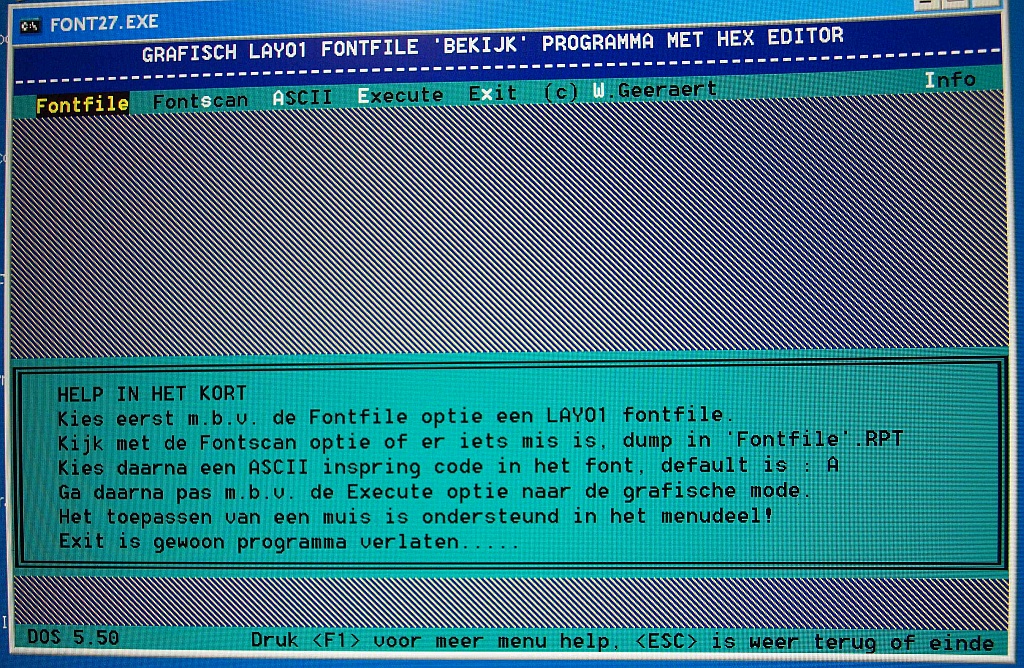
DOS opening
HEX edit mode
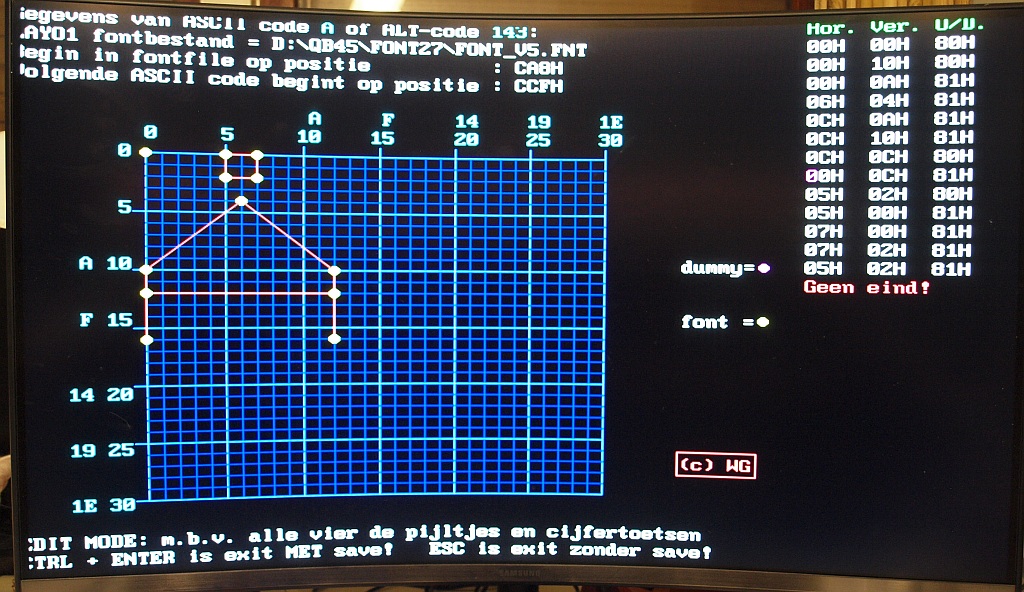
LAYO1 FONT
HEX EDITOR
FONT27.ZIP
|
Even more: The font repair utility to correct LAYO1 for DOS font errors. Version FONT27.EXE
This only works on very old video cards in an very old machine and preferably DOS 3 to 5 only (or probably a W9x DOS-box). It is programmed long ago around an old DOS Quick/Power Basic video enhance library that doesn't work in faster machines that produce a "Runtime 200" error.
It will not work properly in a DOS-shell under nowadays Windows and also NOT on fast (old) machines.
You only need it once to repair the FONT.FNT file and than you are finished. Or use the FONT_WG3.FNT in this set that is already fixed and enhanced. Rename it to FONT.FNT or point to the new name.
Click over here or left to view one example PDF sheet.
FONT.FNT appears to be the same file as LAYO1PF1.DAT in the Layo1 Windows version. But unfortunately most of the high ASCII's don't work properly under Windows, however some do work.
LAYO1PF1.DAT has the same errors as the original DOS version 4.91 and up from the nineties. Replaced with my version some errors in the characters that do work are corrected.
Where do you need the high ASCII's for?? To make Layo1 better "international" and some nice specials, see the PDF example.
After a lot of trying, I managed to stop the Font27 library runtime errors. It once only worked flawlessly on a very old DOS machine. pre-Windows!
In a maximally truncated DOS window under XP it was still possible to start the program. (min. RAM, 256 colors, 640x480, W95 setting, etc.). Unfortunately only on a single XP.
In the ZIP also the original *.BAS code ........
On the web I have found a released improved ALTQUICK library, NOT 100% the same, calling code needs to be changed. Hopefully soon a version of FONT28 where this "divide by zero error" problem is repaired.
Limitation! Use the standard Layo1 font editing program to ADD or REMOVE (dummy) pixel lines. Use FONT27 to change the POSITION of EXISTING good or bad pixels or lines. E.g. to change a dummy line into a missing end pixel.
Also: only in FONT27 can you see orphan pixels! Make a line to it and remove in the other program.
|
Nog meer: Het font reparatie programma om fouten uit het LAYO1 voor DOS fontbestand te halen. Versie FONT27.EXE
Dit werkt alleen met erg oude video kaarten op erg oude PC's, dus het liefst op een oud machientje in alleen DOS 3 - 5 (of desnoods een W9x DOS-venster).
Er is ooit gebruik gemaakt van een oude Quick/Power Basic video versneller routine bibliotheek. Het werkt absoluut niet onder een moderne Windows of iedere snelle DOS machine, bijv. eentje die ook de "Runtime 200" geeft.
Je hebt het eigenlijk maar 1 keer nodig om FONT.FNT te repareren en dan ben je klaar. Of gebruik FONT_WG3.FNT in deze set die al OK is en uitgebreid.
Geef het de naam FONT.FNT of wijs in Layo1 naar de nieuwe naam
Klik hier of links om een voorbeeld PDF velletje te zien.
FONT.FNT blijkt hetzelfde bestand te zijn als LAYO1PF1.DAT in de Layo1 Windows versie. Maar helaas, de meeste hoge ASCII's werken niet goed onder Windows, hoewel enkelen het weer wel doen.
LAYO1PF1.DAT heeft dezelfde fouten als de originele DOS versie 4.91 en hoger uit de jaren 90.
Vervangen door mijn versie zijn de fouten in de werkende karakters opgelost!
Waarvoor zou je de hoge ASCII's benutten?? Om Layo1 "internationaal" te maken en enkele leuke specials, zie het PDF voorbeeld.
Na heel veel proberen is het gelukt om de Font27 library runtime errors tegen te houden. Het werkte ooit alleen op een heel oude DOS machine foutloos. pre-Windows!
In een maximaal afgeknepen DOS venster onder XP is het toch gelukt het progje te starten. (min. RAM, 256 colors, 640x480, W95 setting, enz). Helaas slechts op 1 XP doos.
In de ZIP ook de *.BAS code........
Op het web heb ik een vrijgegeven verbeterde ALTQUICK library gevonden, NIET 100% hetzelfde, er moet aanroep code aangepast worden. Binnenkort hopelijk een versie FONT28 waarin dit "delen door NUL error" probleem gerepareerd is.
Beperking! Gebruik het standaard Layo1 font edit programma om (dummy) pixels lijntjes TOE te voegen of WEG te halen. Gebruik FONT27 om BESTAANDE goede of foute pixels of lijntjes van POSITIE te veranderen. Bijv. een dummy lijntje te veranderen in een ontbrekend eind-pixel.
Ook: alleen in FONT27 kun je wees-pixels zien! Maak er een lijntje van en bewerk in het andere programma.
|
Orcad postscript
Enhance utility
Verfraaings programma
Enhanced postscript
Original postscript
|
All postscript output (both Layo1 and Orcad for DOS) can easily be converted to PDF.
Use for example Adobe Distiller.
Further down you find a utility to "repair" Layo1 postscript.
In this field a utility that enhances the ORCAD postscript to give it a decent look.
It will no longer look like matrix-printer output! Just look at all the example design files on this site!
Or Click on a single example left
|
Alle postscript output van zowel Layo1 als ORCAD voor DOS kan eenvoudig omgezet worden naar PDF.
Gebruik bijv. Adobe Distiller.
Iets lager een setje om Layo1 postscript te "repareren".
In dit veld een programma dat de ORCAD postscript uitvoer een fatsoenlijke smoel geeft zodat het niet meer op matrix-printer output lijkt.
Zie gewoon alle voorbeeld files op deze site!
Of klik op een enkel voorbeeld links
|
LAYO1 postscript
Enhance and repair utility
Verfraaings en verbeter programma
|
This is a separate version of the LINO3.EXE utility
It is to "repair" Layo1 postscript. You cannot make proper PDF files out of the LAYO1 postscript and the output on phototypesetters goes wrong without this utility!
You can drop Layo1 *.P0x files on a batch-PIF from this program (with extra parameters) and see the repair result in a DOS-box.
The patched copy of the file will have a name like *.E0x
Most errors are in the %%BoundingBox line and the mirroring is wrong.
Cripple mirroring is removed and the %%BoundingBox parameters are calculated again and patched back in the PS-file.
The calculated values are ONLY valid for a scaling factor of 1.000 !!!
The job-measurement results are presented in a DOS-box in Layo-points, PS-points and millimeters.
See above for some more explanation
|
Dit is een op zichzelf staande set van het LINO3.EXE programma
Het is bedoeld om de LAYO1 postscript te "repareren". Je kunt er anders niet goed PDF van maken en de output op film belichtingsmachines gaat zonder dit progje FOUT!
Je kunt de Layo1 *.P0x bestanden verslepen op een batch-snelkoppeling (met extra parameter doorgave) en het reparatie resultaat zien in een DOS-venster.
De aangepaste kopie van het bestand krijgt een naam zoals *.E0x
De meeste fouten zitten in de regel %%BoundingBox en de spiegeling is fout.
Kreupele spiegeling wordt weggehaald en de %%BoundingBox waarden opnieuw berekend en teruggeplaatst in het PS-bestand.
De berekende waarden zijn ALLEEN geldig bij een schaalfactor van 1.000 !!!
De resulterende job afmetingen worden in een DOS venster gepresenteerd in Layo punten, PS-punten en in millimeter.
Zie hoger voor iets meer uitleg
|
LAYO1 postscript V4
Enhance and repair utility
version 4 beta
Verfraaings en verbeter programma
|
This is a new beta version of the repair utility, called LINO4.EXE
It is to "repair" LAYO1 postscript.
Same as above but much more enhanced calculation and repair. Scale factor no problem any more, also for PDF creating it would be nice to have an extra width parameter! It's done!!
Drag a Layo1 *.Pxx file on the repair PIF of the batch, drag the resulting *.Exx on Adobe Distiller and be amazed!
You have to manually edit the dos path in the start PIF for the batch file!! I placed the files in the E:\POSTSCRI dir. Also use and point to the added icon.
See above for some more explanation
|
Dit is een nieuwe beta versie van het reparatie programma, het heet LINO4.EXE
Het is bedoeld om de LAYO1 postscript te "repareren".
Hetzelfde als hierboven maar meer geavanceerde berekening en reparatie. Scale factor geen probleem meer en voorbereidend op PDF creatie bleek het handig ook extra breedte toe te kunnen voegen! Dat is gelukt!!
Sleep een Layo1 *.Pxx bestand op de reparatie snelkoppeling, sleep de resulterende *.Exx op Adobe Distiller en wees aangenaam verrast!
Je moet wel de dos paden editten in de start PIF van het batch bestand!! Bij mij staan de bestanden in de E:\POSTSCRI dir. Gebruik tevens de bijgevoegde icon.
Zie hoger voor iets meer uitleg
|
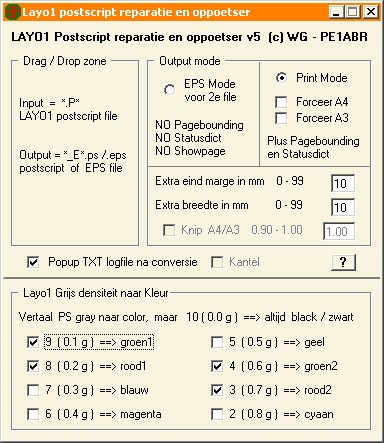
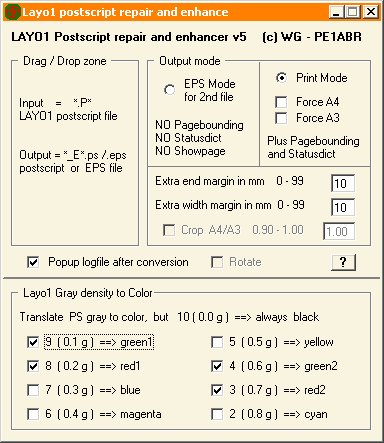
LAYO1 postscript V5.3
Enhance and repair utility
At last - a Windows shell!
version 5.3 in Visual Basic
Verfraaings en verbeter programma
Eindelijk met een Windows snuitje
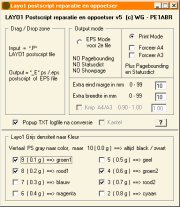
Klik plaatje voor vergroting
NL scherm
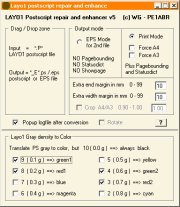
Click picture for enlargement
UK screen
VB6 Runtime and dialog files
Now with Win7 - Win10 admin compatible batch file.
WINHLP32 files
Now with Win7 - Win10 admin compatible 32 bit batch file.
WINHLP32 files
Now with Win7 - Win10 admin compatible 64 bit batch file.
|
This is the latest version of the postscript repair utility, now with a Windows shell from Visual Basic, this version is called LAYO1_PS_REPAIR.EXE
It is not only to "repair" LAYO1 postscript, but now also with a lot of new features.
Same possibilities as the DOS version4 above, the engine of version 4 still is the center, but now with more enhanced options!!
The program not only optimizes the postscript code ( pre-stage for PDF!), it is now also possible to optimize for EPS. This appeared handy to copy (in Notepad+) more small Layo1 postscript items in the same larger job, for printout on the same UV-sheet, or for 1 PDF sheet. After the main job (pref. in forced_A4 mode), just before the command "showpage", you can add extra smaller jobs in EPS code, separate those jobs with the commands "gsave" and "grestore" from the other PS-code. Also give some shift with the "translate" command, see an example file for How_to.
Experimenting with PS-code it appeared handy (and simple!) to convert Layo1 outputdriver gray-commands to color. That looks very nice in PDF for documenting purposes!!
A PDF printout problem appeared: Some inkjet printers drivers try to add their own white margin, a full page is unwanted scaled if you are too hurried in Acrobat with the settings. There is a difference between scaling an A4 to A4 (!?!) or NO (@#$%&) scaling al all! To overcome that problem a small crop ( = cut) percentage is also added. F.i. 5 mm.
Drag a Layo1 *.Pxx file on the Drag-Drop zone and be amazed with the result in Acrobat or Ghostview ( for EPS!!)!
Because there are lots of settings it could be annoying that you have to set them every time in the same way, other than default. An INI txt-file has been made to preset what you want only once for a particular job. You can also set a language option to change the interface AND the logging from Dutch to English!
Meanwhile version 5.3.0.9 !
If your XP or W2K is very "clean" you also need the RUNTIME and dialog files (left).
For WIN7 - WIN10 you also need the WINHLP32 batch, otherwise Winhelp is disabled.
See above for some more explanation of the postscript code.
|
Dit is de laatste en meest geavanceerde versie van het reparatie programma, nu eindelijk met een Windows snuitje uit Visual Basic, deze versie heet LAYO1_PS_REPAIR.EXE
Het is niet alleen bedoeld om de LAYO1 postscript te "repareren", maar nu ook met een paar speciale extra's.
Vanzelfsprekend dezelfde fijne mogelijkheden als de DOS versie4 hierboven, het motortje van versie 4 zit er middenin, maar nu met een paar geavanceerde opties!
Het programma optimaliseert nu niet alleen de postscriptcode in voorbereiding op PDF creatie, maar het is nu ook mogelijk te optimaliseren voor EPS. Dit bleek handig te zijn voor het later kopieren in Notepad+ van meerdere kleine Layo1 jobs in een grote job, om later af te drukken op 1 UV-vel, of voor in 1 PDF pagina. Na de hoofdjob (eventueel in geforceerd A4 mode) en net voor "showpage" voeg je de extra items in EPS code toe tussen "gsave" en "gerestore" commando's. Je moet wel handmatig een shift meegeven met het "translate" commando, HOE?? dat kun je afkijken in een voorbeeld job.
Al experimenterend met postscript code bleek het handig (en simpel) te zijn de Layo1 outputdriver Gray (postscript grijs) code om te zetten naar een kleurtje. Dat ziet er dan later in PDF prachtig uit voor documentatie doeleinden!!
Er kwam een nieuw PDF afdruk probleem op de proppen: Sommige inktjet printer drivers proberen een vol A4 stiekum te verkleinen door hun eigen kleine witrandje toe te voegen. Vooral als je in Acrobat iets te haastig werkt. Er is een verschil tussen een A4 aanpassen aan een A4, of er (@#$%&) afblijven. Er is nu een optie om een klein witrandje van een volle pagina af te knippen ( bijv. 5 mm)
Sleep een Layo1 *.Pxx bestand op de reparatie Drag-Drop zone en wees aangenaam verrast door het resultaat in Acrobat of Ghostview (voor EPS!!)!
Omdat er een heleboel (extra) instellingen zijn kan het vervelend worden als je die elke keer net even anders moet instellen dan standaard. Daar hebben we een INI tekst bestand voor uitgevonden waar je de instellingen voor een bepaalde toepassing in 1 keer goed zet. Ook kun je een taaloptie instellen waardoor alles (ook de logfiles) plots schakelbaar zijn tussen Nederlands en Engels.
Ondertussen al versie 5.3.0.9 !
Als je XP of W2K erg kaal is heb je de RUNTIME en dialoogvenster files (links) ook nog nodig.
Voor WIN7 - WIN10 heb je de WINHLP32 batch ook nodig, Winhelp is anders uitgeschakeld.
Zie hoger voor iets meer uitleg van de postscript code
|

 UPDATE: see the last section for an enhanced Windows version of the postscript repair program for Layo1!